The Problem
Weather reaches the flight deck as text. METARs and TAFs are read one station at a time, significant weather is described in coordinates, and the precipitation picture lives in another app. Building a mental image of the route — which airports are below minima right now, where the weather is moving, what the arrival will look like at the hour the aircraft gets there — means assembling it from a dozen sources, and assembling it again every time something changes.
The picture a crew needs is not a list. It is spatial, and it is tied to the clock: the conditions along the route, at the time the flight will be there.
“Weather is a map and a clock, not a stack of reports.”
What is AWI?
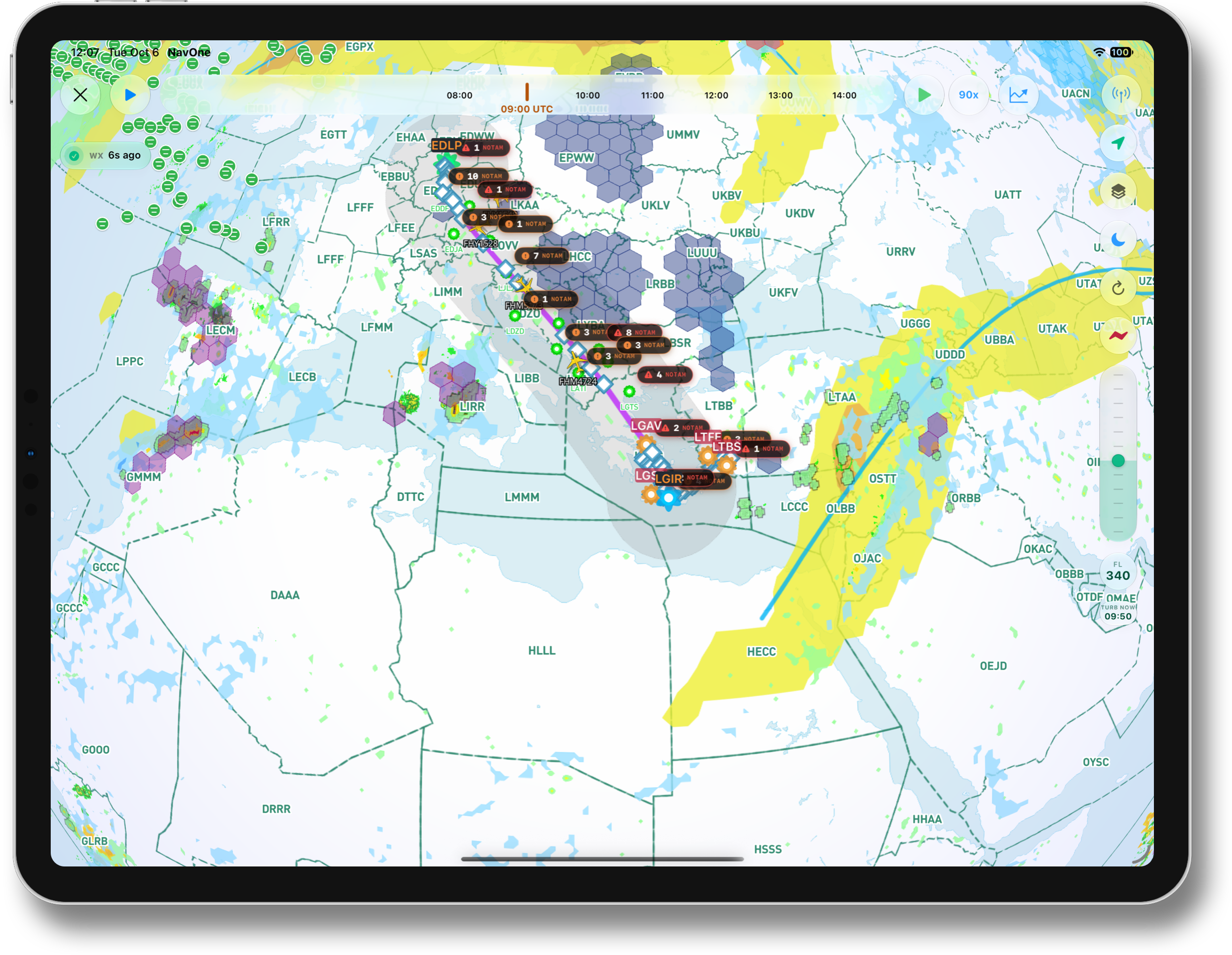
AWI — All Weather Information — is the NavOne feature that puts live weather on the map. Fed by leading weather-data providers, it draws the current conditions over the same chart the crew already navigates: precipitation, significant weather areas, and every airport coloured by its METAR flight category, with the planned route and its waypoints running through the middle of it. The data refreshes continuously, and the age of the picture is shown on screen, so nobody has to wonder how current it is.
Nothing is interpreted for the crew. Every colour on the map traces back to a report — a METAR, a TAF, a significant-weather bulletin or the precipitation feed — and a tap on any airport opens the reports behind it.
The NavOne Approach
AWI does not add another page of reports; it puts the reports where they belong. Each airport is a dot in its flight-category colour, so a glance across the chart shows which stations are VFR, which are marginal and which have gone IFR. Significant weather areas are shaded where they sit relative to the track, and precipitation is overlaid from live imagery, so the crew sees whether the weather is on the route, beside it or already behind it — without reading a single coordinate.
A timeline runs along the top of the map. Dragging it, or letting it play, moves the picture forward through the forecast period in UTC, so the conditions at the arrival time are seen before departure rather than inferred from a TAF string. Layers switch on and off from the side of the map, an altitude slider sets the flight level the layers are drawn for — so what is shown at FL340 is the weather at FL340, not at the surface — and the FIR boundaries stay underneath so the picture is always read in the right airspace.
Airports at a Glance
Every reporting station on the chart carries its current flight category as a colour, so the map itself is the overview: the departure, the destination, the alternates and the airports along the way are read in one look. Airports on the route carry their NOTAM badges as well — the counts of critical and warning NOTAMs from the same NOTAM intelligence that powers NavOne's NOTAM tab — and one tap opens the airport with its METAR, TAF and NOTAMs together.
The Forecast in Motion
The timeline is the part crews use most. It starts at the current observation and runs forward through the forecast period; dragging the marker, or pressing play, advances the overlays hour by hour so the forecast is watched as a sequence rather than decoded line by line. The question “what will the arrival look like at 13:00?” is answered by moving the marker to 13:00.
Significant Weather and Precipitation
Significant weather is drawn where it is. SIGMET areas are shaded regions on the chart; turbulence and convective hazards are drawn as cells at the selected level; the jet stream runs across the map as a line; and precipitation is overlaid from the live feed. The crew sees how far each one extends and how it lies against the planned track, and because the route is drawn on the same map, the crossing is obvious: the weather either sits on the track at that level or it does not.
Route Conditions
The planned route is drawn with its waypoints over the weather picture, from the departure to the destination and on to the alternates. Reading the conditions along the route means following the line: the airports it passes, the areas it crosses and the stations nearest to it, all in their current state and all moving with the timeline. The operator's other aircraft in the air appear on the same map with their flight numbers, so the picture is the fleet's, not just the flight's.
Vertical Flight Profile
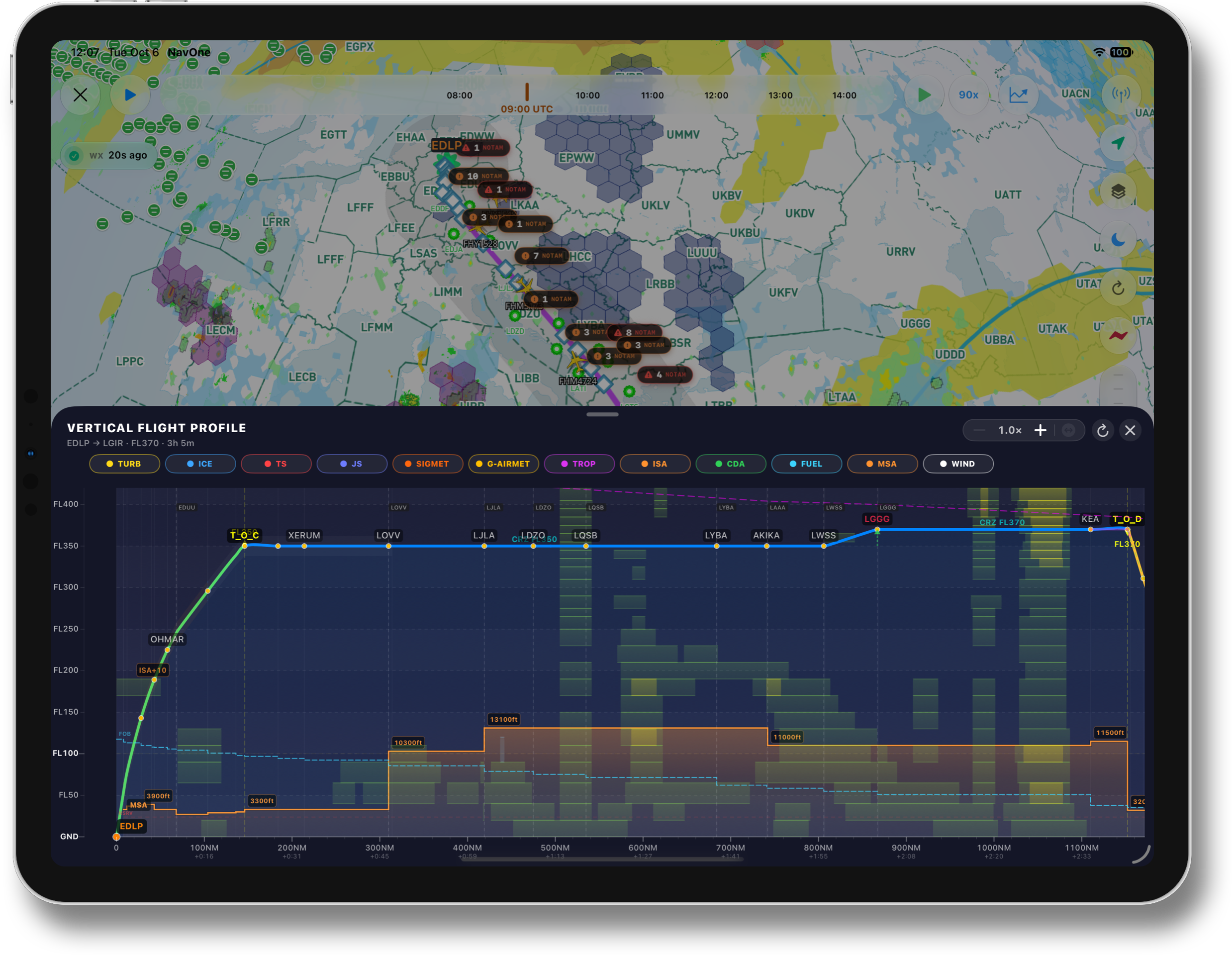
The map answers where. The Vertical Flight Profile answers how high. A tap on the chart button opens VFP as a panel over the map: the whole flight as a side view, from departure to destination, with distance along the bottom in nautical miles and elapsed time, and flight levels up the side. The planned profile is drawn on it — climb, cruise, every step climb, the top of descent — with the waypoints and the FIR boundaries the route crosses, and the forecast drawn around it at the altitudes where it actually is.
The layers are the ones that matter in the vertical: turbulence, icing and thunderstorms as cells at their forecast levels, the jet stream, SIGMET and G-AIRMET areas, the tropopause as a line across the top, the ISA deviation on the climb, and the wind. Underneath run the operational lines — the minimum safe altitude as a step line along the route, and the fuel on board falling away with distance — so the profile is read against both the weather and the aircraft. Each layer switches on and off from the strip above the chart, and the panel zooms along the route for the detail.
What the crew gets is a single look at the question that otherwise takes a dozen reports to answer: does the planned level pass through the weather, above it or below it — and where along the route would a different level be clear. A cruise that sits under a turbulence layer for two hundred miles, an icing band at the step-climb level, the tropopause folding down towards the planned altitude: all of it is visible on one picture, in the right place and at the right height.
Together with Flight Watcher
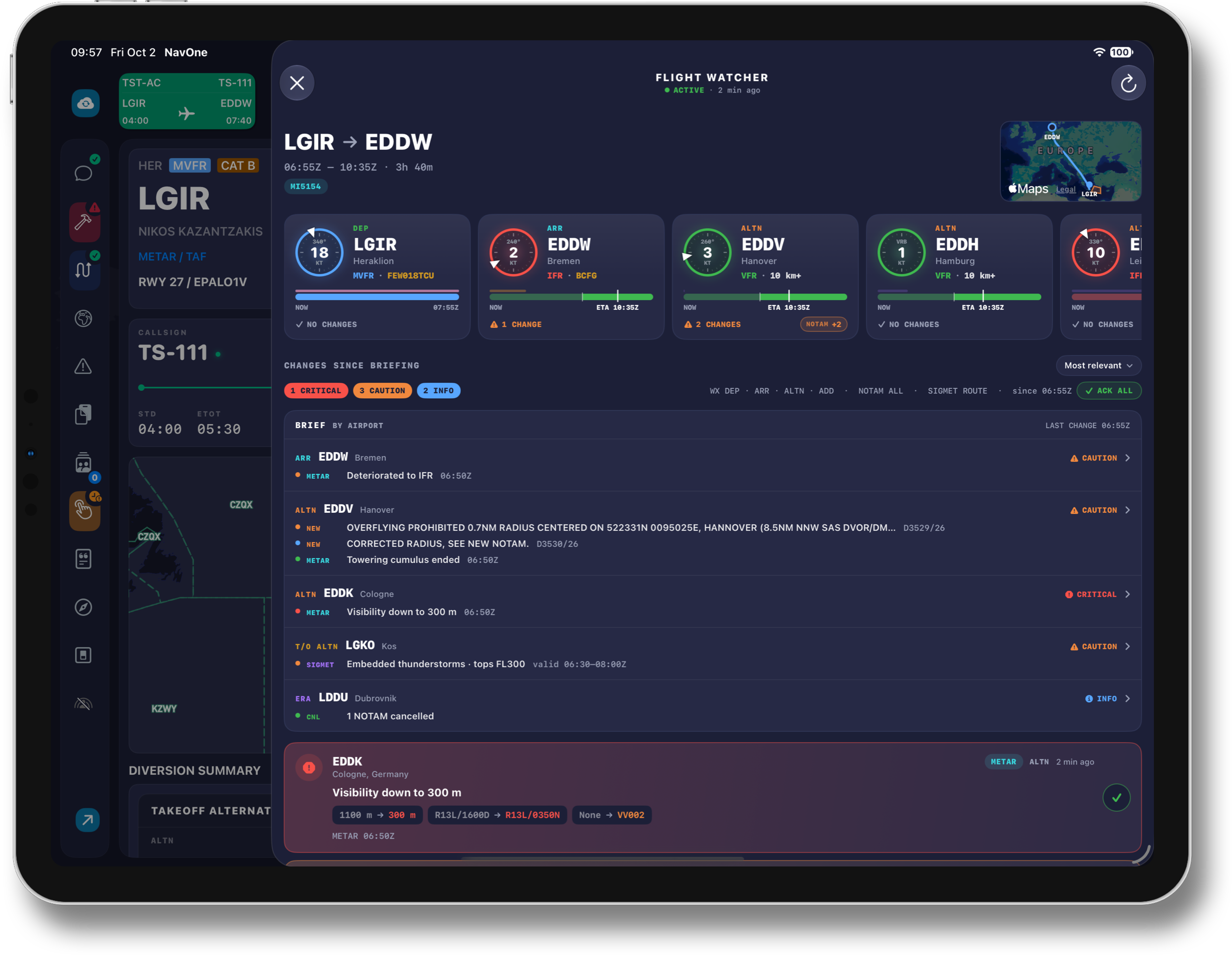
AWI and Flight Watcher are two halves of the same idea. AWI shows the picture — the conditions now and through the forecast, on the map. Flight Watcher reports what has changed since the briefing, airport by airport, ranked by what it means for the operation. A crew that sees a change card in Flight Watcher opens AWI to see where it is; a crew watching the weather move on AWI relies on Flight Watcher to say when it matters.
Key Features
Current conditions from leading weather-data providers, refreshed continuously, with the age of the picture shown on screen.
Every reporting station coloured by its METAR flight category, with the METAR and TAF one tap away.
A UTC timeline that drags or plays through the forecast period, and an altitude slider that sets the level the layers are drawn for.
SIGMET areas, turbulence and convective cells, the jet stream and live precipitation, drawn where they sit against the planned track.
The planned climb, cruise and descent as a side view against turbulence, icing, thunderstorms, the jet stream and the tropopause — with MSA and fuel on board underneath.
The planned route with its waypoints, FIR boundaries underneath, the operator's other aircraft in the air, and NOTAM badges on the airports along the way.
Why It Matters
Most of the time spent on weather in the cockpit is spent turning text into a picture. AWI delivers the picture directly, current and in the right place, and lets the crew spend that time on the decision instead: the alternate that is already below minima, the shower line that will reach the destination before the aircraft does, the area that sits exactly on the planned track at cruise time. Seen on the map and moved through on the timeline, these are judgements made in seconds — and made by the whole crew looking at the same screen.
“The weather of the whole route, at the hour that matters, on one map.”
- Live weather from leading weather-data providers, drawn on NavOne's own map
- Every airport coloured by its METAR flight category, reports one tap away
- SIGMET areas, hazard cells, the jet stream and precipitation overlaid against the planned route
- A UTC timeline that drags or plays the forecast forward, and an altitude slider for the level shown
- A Vertical Flight Profile: the planned profile against turbulence, icing, thunderstorms, the jet stream and the tropopause, with MSA and fuel on board
- NOTAM badges on the airports along the route, and the fleet's other flights on the same map
- The age of the data shown on screen at all times
- Built to pair with Flight Watcher: AWI shows the picture, Flight Watcher reports the change