The Problem
A briefing package is a snapshot. The OFP is computed, the METARs and TAFs are attached, the NOTAMs are collected — and from that moment on, the picture starts to age. Between the navlog download and the top of descent, METARs are reissued every half hour, TAFs are amended, NOTAMs are issued and cancelled, and significant weather builds along a route the aircraft has not reached yet.
Crews re-check the destination, and often an alternate. But a single flight can carry dozens of airports — departure, destination, alternates, the take-off alternate, en-route alternates, ETOPS airports and the airports of the NOTAM briefing area. Nobody re-reads them all, and nobody can tell at a glance which of today's reports differs from the one in the briefing in a way that matters. The question in the cockpit is rarely “what is the weather?”. It is “what changed since I briefed, and does it matter for my flight?”
“A briefing is a snapshot. The flight is not.”
What is Flight Watcher?
Flight Watcher is the NavOne feature that keeps the briefing alive. It opens from the flight plan's fan menu, next to Flight Info, and from the moment the navlog is downloaded it registers the flight with CPT. Mayk, Lagary's intelligent aviation assistant. CPT. Mayk watches every airport in the package: METAR and TAF are re-checked every minute, the significant weather along the route every five minutes, and NOTAM changes arrive live. The iPad computes nothing — it registers the flight and renders what the server sends.
What the crew sees is a single list: the changes since briefing, each with its severity, the airport and its role, and the report it came from. Nothing is generated by a language model. Every line is traceable to a METAR, a TAF, a NOTAM or a SIGMET, and the same input always produces the same card — reconnecting, relaunching or opening the flight on another iPad never re-alerts.
The NavOne Approach
Flight Watcher does not compare weather with weather. It compares weather with the operation. Every airport is watched in the window that matters for its role: the departure around the ETD, the destination and alternates around the ETA, en-route alternates and ETOPS airports for the whole flight. A delay moves the windows with it, and a forecast change that only came into view because the window moved is labelled as such instead of being mistaken for an amendment.
Changes are measured against the briefing. A wind that has veered 60° or more since the briefing METAR is reported as a likely runway change; a QNH drift of 5 hPa or a temperature drift of 5 °C updates a single card in place rather than piling up new ones. Visibility, ceiling, RVR and wind are judged against operational thresholds, flight-category drops are reported with hysteresis so a value oscillating around a limit does not alarm twice, and improvements are reported too — “Improved to MVFR”, “Thunderstorm ended” — so an open alert can close. Airports are weighted by role: an en-route alternate has to deteriorate further than the destination before it earns a card.
The rule set was calibrated against more than 130,000 real METARs and 68,000 TAFs, so that Flight Watcher speaks up for operational change and stays quiet for noise.
Airport Tiles and the Brief
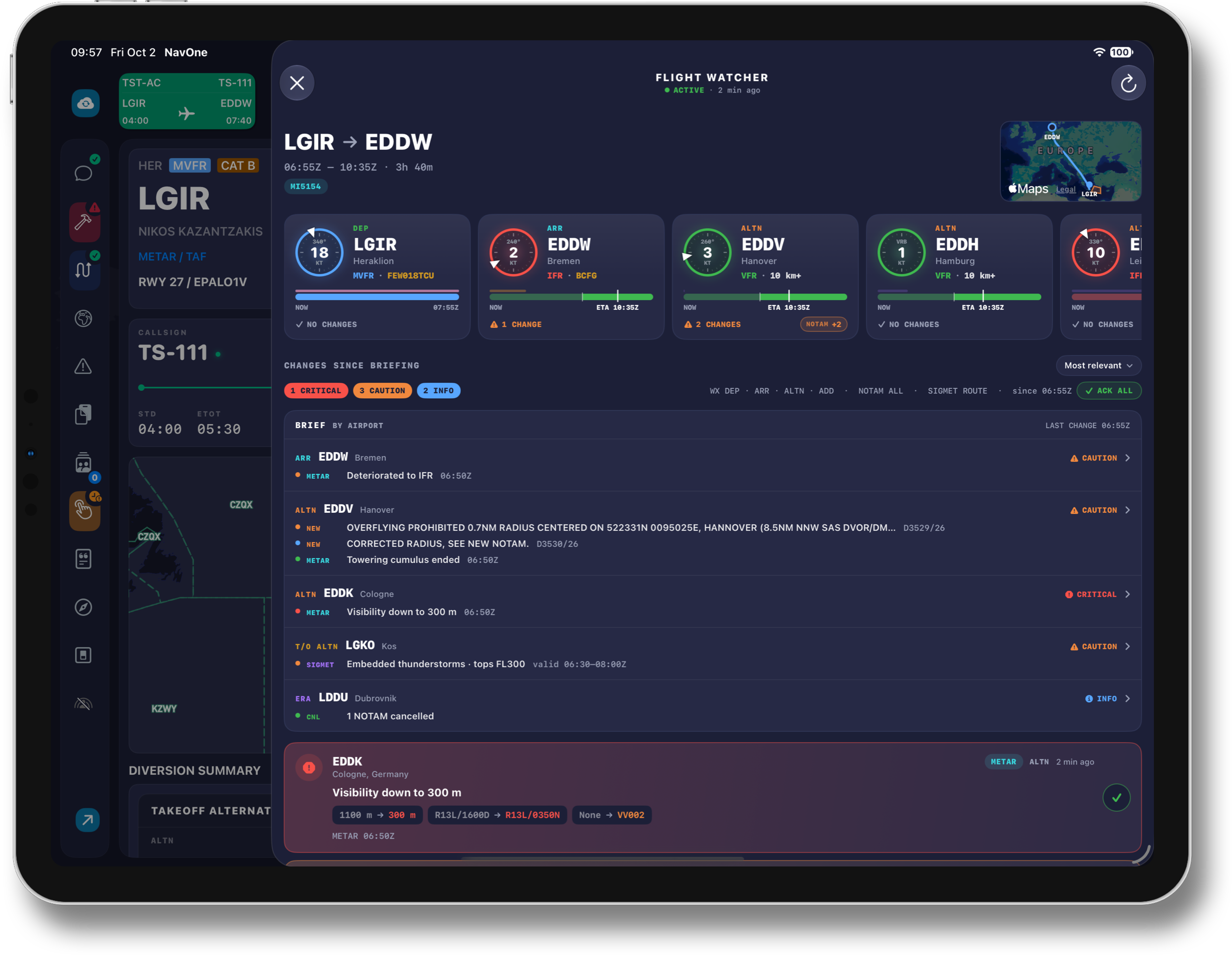
The main screen opens with one tile per primary airport. A station dial shows the METAR flight category as a coloured ring with the wind as a pointer on it; below it, a forecast ribbon runs from now to the end of the airport's window, drawing the TAF segments in their category colours with TEMPO and PROB periods on a lane above, and the ETD or ETA as a marker. The footer counts the changes and carries the NOTAM badge — new, cancelled and modified — so the state of every airport is readable before a single card is opened.
Under the changes header, the BRIEF groups every open change by airport in the order a crew thinks — departure, arrival, alternates, take-off alternate, then en-route — and lists each one in the words of the report: “ARR EDDW · Deteriorated to IFR”, “ALTN EDDK · Visibility down to 300 m”, “T/O ALTN LGKO · Embedded thunderstorms · tops FL300”. One tap opens the airport.
NOTAM Changes, Live
Flight Watcher compares the NOTAMs in the package with the live NOTAM feed and reports what appeared, changed or was cancelled after the package was built — at every live-monitored airport, including en-route alternates that never made it into the NOTAM tab. Each item is shown with the same NOTAM card the crew knows from the NOTAM tab, with NEW, MOD and CNL badges, and the card clears the moment the airport is refreshed, so the watcher and the NOTAM tab never disagree. US DoD notices are filtered out, and an airport whose server baseline is older than the package says so instead of inventing phantom cancellations.
Significant Weather on the Route
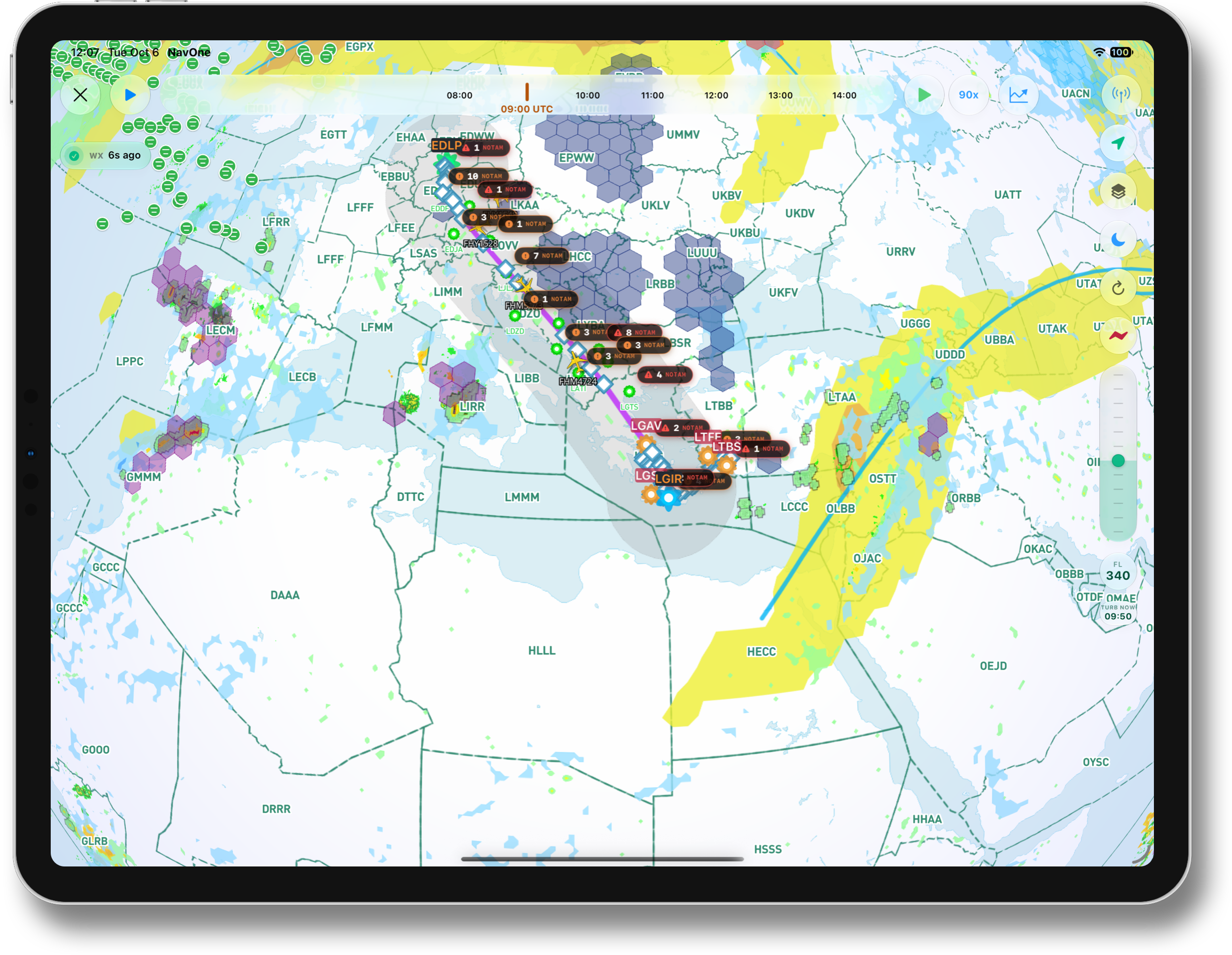
Significant weather along the route — embedded thunderstorms, severe turbulence, severe icing, mountain waves, volcanic ash, dust and sandstorms, radioactive clouds and tropical cyclones — is checked every five minutes against the planned route and levels, from the international SIGMET bulletins that carry it. The route is sampled along its waypoints and tested against each hazard area, its validity and its vertical extent, and the card tells the crew whether the flight passes through the area, above it or below it — and when. The areas are drawn on the panel's route map, and departure, destination and alternates that sit inside an area during their window are flagged as well, each hazard with its own severity.
History and WX Trend
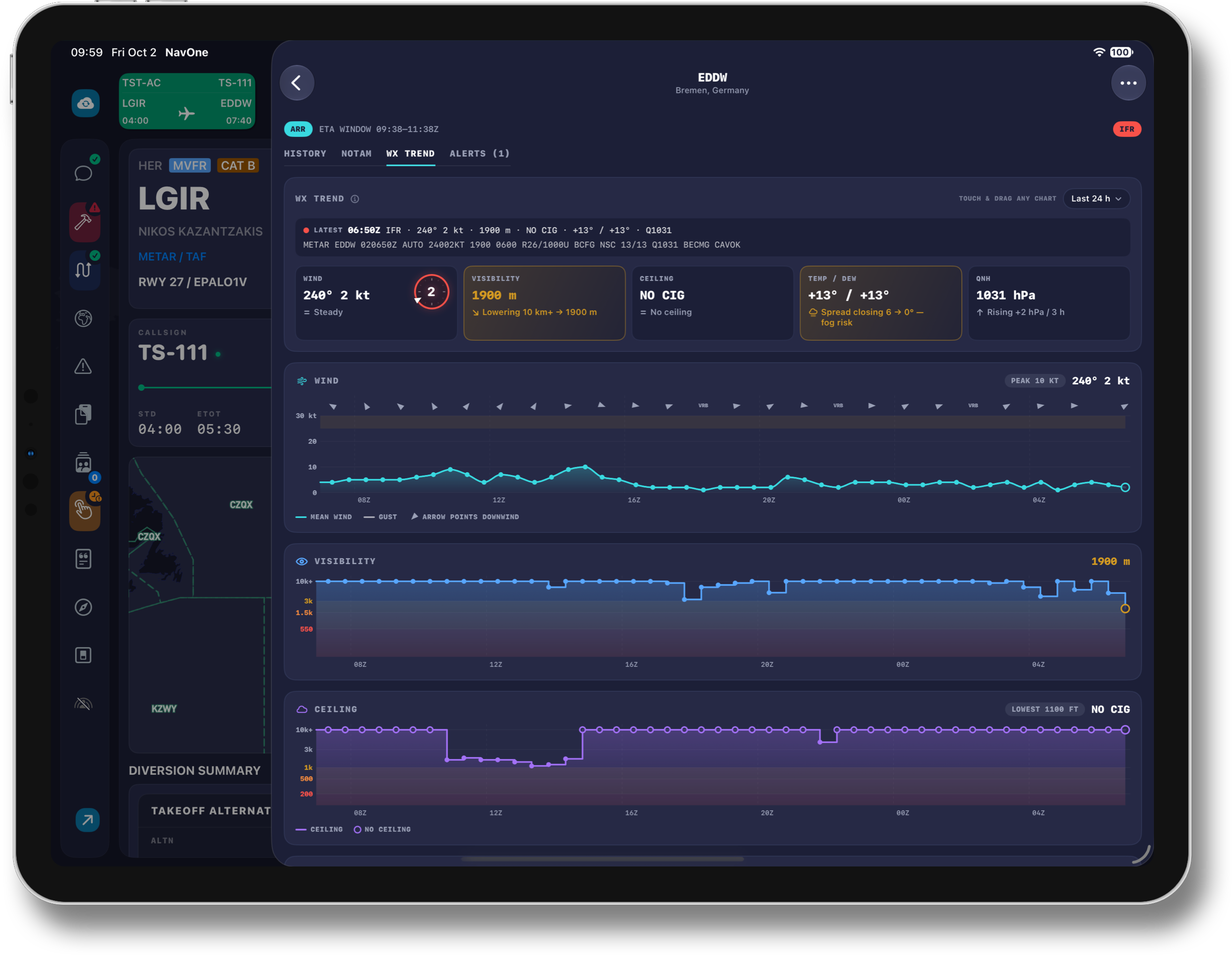
Every airport opens into its own screen. HISTORY shows the METAR flight category over the last hours together with the wind, the TAF laid against the arrival or departure window with the worst conditions in the window called out, and the NOTAM status of package versus server. WX TREND draws 24 hours of wind, visibility, ceiling, temperature and dew point, and QNH as charts the crew can touch and drag through, each with a one-line reading of what it is doing — “Lowering 10 km+ → 1900 m”, “Spread closing 6 → 0° — fog risk”. Once opened, a trend is saved on the iPad and stays available offline, and the recent history of the primary airports is fetched ahead of time for the same reason.
One Watch, Every iPad
CPT. Mayk keeps one watch per crew member and flight. Every NavOne iPad signed in with the same account joins the same session, so an acknowledgement, a NOTAM refresh or an airport added on one iPad reaches the others at once. Cards are acknowledged with a tap or with ACK ALL and return only when conditions cross another threshold; the badge on the Flight Info button counts the alerts not yet seen. The watch pauses when the flight is completed, and NavOne's home-screen widget carries a Flight Watch digest — departure, arrival and alternate conditions with the top changes — refreshed in the background every fifteen minutes.
Key Features
Every change is measured against the moment the navlog was downloaded. Deterministic events mean a reconnect, a relaunch or a second iPad never re-alerts.
Departure around the ETD, arrival and alternates around the ETA, en-route airports for the whole flight. Delays move the windows, and a moved window is labelled rather than mistaken for an amended forecast.
Departure, destination, alternates, take-off alternate, en-route alternates, ETOPS and briefing-area airports — often more than fifty per flight — with METAR and TAF re-checked every minute.
New, modified and cancelled NOTAMs since the package was built, shown with the NOTAM tab's own card and cleared by the same refresh.
Thunderstorms, severe turbulence and icing, mountain waves, volcanic ash and more, tested against the planned route and levels every five minutes, with the crossing time and whether the flight passes through, above or below.
Flight-category history, TAF against the window, NOTAM package-versus-server status and 24-hour weather trends, saved on the iPad for the leg.
Why It Matters
Re-briefing is work that competes with flying the aircraft, so it gets done for the destination and skipped for the airports that rarely matter — until the day one of them does. Flight Watcher does the re-reading for all of them, continuously, and reduces the result to a short list a crew can act on: the alternate that went below minima while the aircraft was still at the gate, the thunderstorm that entered the route after push-back, the runway that closed an hour after the briefing. Decisions about fuel, alternates and runways are made earlier, with the whole crew looking at the same list.
“A briefing should not expire at the gate. Flight Watcher keeps it current until the aircraft is on blocks.”
- Changes since briefing for every airport in the package — METAR, TAF, NOTAM and en-route weather
- Role-aware windows around the ETD and ETA that follow delays
- Thresholds measured against the briefing, with hysteresis and improvements reported
- Live NOTAM additions, modifications and cancellations with the NOTAM tab's own card
- Significant en-route weather — convective activity, turbulence, icing, volcanic ash — tested against the planned route and levels
- Airport tiles with station dial and forecast ribbon, and a BRIEF by airport
- HISTORY and WX TREND charts, saved on the iPad for offline use
- One session per crew member, shared by every NavOne iPad on the account